
Model comparison · September 2026
GPT Image 2.5 vs GPT Image 2: What’s New and Which Should You Use?
OpenAI officially released ChatGPT Images 2.5 / GPT Image 2.5 in September 2026. Here is a practical breakdown of how it improves on GPT Image 2 — and when to keep using the previous model on GPTImagine 2.5.
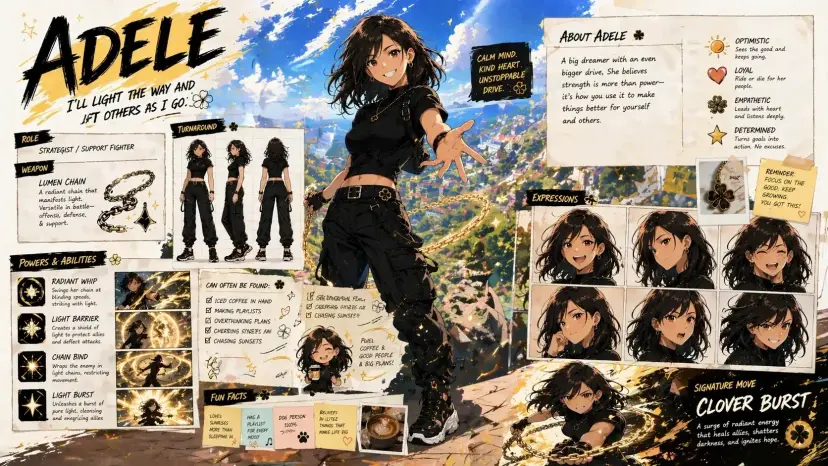
Side-by-side summary
| Capability | GPT Image 2.5 | GPT Image 2 |
|---|---|---|
| Status | Officially released (Sep 2026) | Previous-generation production model |
| Speed | Up to ~50% lower latency (Flare) | Solid baseline for iterative work |
| Image fidelity | Sharper detail, richer texture, more natural light | Strong quality, less refined realism |
| Reference preservation | Better subject recognition across edits | Good reference guidance |
| Edit precision | Change only what you ask for more reliably | Focused edits, more drift risk |
| Multi-turn consistency | Stronger across longer edit chains | Useful, but quality can degrade |
| Best fit | Daily creation, ads, product, campaign polish | Familiar workflows still in production |
If you already ship creative work on GPT Image 2, the question is not “is 2.5 different?” — it is “does the upgrade change my daily loop?” For most teams, yes: GPT Image 2.5 is faster, more faithful to references, and better at localized edits.
What OpenAI shipped in GPT Image 2.5
In ChatGPT, the release is branded ChatGPT Images 2.5. In the API, OpenAI introduced two related models: GPT Image 2.5 Flare for high-quality everyday generation at lower latency, and GPT Image 2.5 Sunburst for premium creative work that needs tighter edit control with longer generation times. GPTImagine 2.5 focuses on the Flare-class workflow for creators who need speed and quality in one browser studio.
- Sharper details with more natural lighting and richer textures
- Better subject preservation from reference photos
- More reliable precision editing across complex backgrounds
- Stronger multi-turn edit consistency without rebuilding the whole asset
- Up to about 50% lower generation latency versus GPT Image 2 for Flare
Where GPT Image 2.5 beats GPT Image 2
1. Speed without giving up quality
GPT Image 2.5 Flare is positioned as higher quality than GPT Image 2 at substantially lower latency. That matters for social batches, product variants, and prompt exploration — the loops where waiting twice as long kills momentum.
2. Edits that stay local
Both models can edit from a reference. GPT Image 2.5 is better at changing one element — a label, background, product color, or prop — while keeping character identity, composition, and brand treatment intact. That is the difference between “one more revision” and “start over.”
3. Multi-turn creative conversations
Campaign work rarely finishes in one prompt. GPT Image 2.5 holds earlier decisions more reliably across a sequence of edits, so later instructions build on the asset instead of slowly eroding it.
4. Reference-led realism
When the brief starts from a real person, product, or location photo, GPT Image 2.5 keeps distinctive features more recognizable as you restyle scenes, lighting, and wardrobe.
Use GPT Image 2.5 as the default for new work. Keep GPT Image 2 only when a live pipeline is already tuned to its behavior and you need continuity for an unfinished series.
When GPT Image 2 is still reasonable
GPT Image 2 remains a capable text-to-image and reference-edit model. It is still useful if you have prompts, aspect-ratio recipes, or client templates calibrated specifically to Image 2 output, or if you are finishing a series that must match earlier frames. For net-new campaigns, posters, ecommerce heroes, and iterative design boards, GPT Image 2.5 is the better default on GPTImagine 2.5.
How to choose inside GPTImagine 2.5
- Choose GPT Image 2.5 for new ads, product shots, social graphics, and edit-heavy polish.
- Choose GPT Image 2 when you must match an existing Image 2 look for continuity.
- Start with a clear prompt; add a reference when identity, packaging, or layout must stay anchored.
- Iterate with focused edit instructions instead of rewriting the entire brief each time.
Bottom line
GPT Image 2.5 is the official successor generation: faster Flare throughput, sharper fidelity, and more controllable edits than GPT Image 2. If you are starting today, start on 2.5. If you already have Image 2 assets in flight, finish them deliberately — then migrate the next project.
FAQ
Is GPT Image 2.5 officially released?
Yes. OpenAI released ChatGPT Images 2.5 and the GPT Image 2.5 API models in September 2026.
Is GPT Image 2.5 always better than GPT Image 2?
For most new creative workflows, yes — especially for speed, fidelity, and precise edits. Keep GPT Image 2 when you need continuity with an existing Image 2 series.
What is GPT Image 2.5 Flare?
Flare is the faster high-quality GPT Image 2.5 model for everyday generation and editing. It is the practical default for creator and product workflows on GPTImagine 2.5.
Can I try both models on GPTImagine 2.5?
Yes. Open the workspace, pick GPT Image 2.5 or GPT Image 2, and compare results on the same prompt and reference.
Upgrade your next image on GPT Image 2.5
Run the same prompt on GPTImagine 2.5 and see the difference in speed, detail, and edit control.
Try GPT Image 2.5